Helpful Ideas:
Selecting New WindowsHome Improvement Tips
How to Install Windows
Energy Star Benefits
View our record at the Better Business Bureau

 Having a problem shopping? It's probably your "Cookies".
Using AOL and experiencing difficulty? Click here for more info.
How to use 1stwindows
We have put this page together to help new users.
We recommend becoming a member since it's totally
free and entitles you use of our innovative pricing tools!
Join 1stwindows - It's Free!
1stwindows members receive access to the latest building material pricing and window quoting technology features multiple quote generation and storage, password protection, customized bidding, comparison pricing and much more! Its fast, simple to join and is open to everyone. Click here to join 1stwindows!
Members now get comparison pricing! Instantly price your current quote in other manufacturers such as 1stwindows, Milgard, International, Summit, Superior and more! 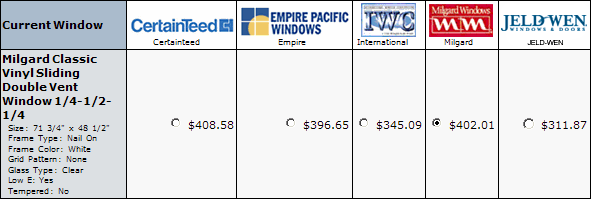
You do not have to be a member to purchase windows!
Click here for a step-by-step guide on how to shop without becoming a member
However becoming a member is free and allows you to create and manage multiple
window quotes. And we do not release your information to anyone for any purpose.
You will need your measurements before you begin to obtain an accurate quote.
If you need help measuring for new windows and doors click here
Having a problem shopping? It's probably your "Cookies". Click here for more info.
Step 1: How To Navigate
Click on any manufacturer's logo below to get started

Step 2: How To Price
After you choose your manufacturer, you will be taken to the next page. Choose (click on) your desired windows style. We selected Milgard Classic Vinyl Horizontal Sliding Window then XO or OX Half Vent. The image and text representing this product is shown below: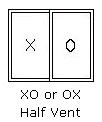
Once you've clicked on the window, you will be taken to the shopping cart for that product where you customize the desired window:
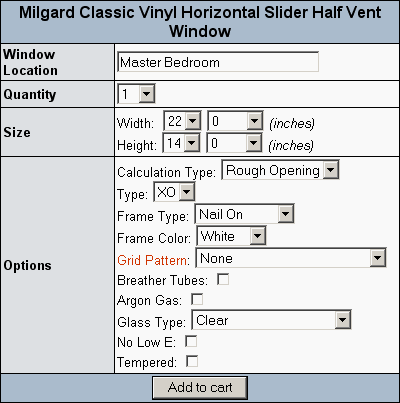
1. We named our Window Location "Master Bedroom".
2. Choose the number of windows that you want in this style.
(If you need 3 identical windows then enter 3). We've chosen "1".
3.Choose your size and options by clicking on any of the arrows  or the boxed text.
4. When you're done, click add to cart and make your next window selection.
5. Your quote are stored at 1stwindows and can be accessed by selecting an account function from the menu at the right hand of the screen. This menu looks like this:
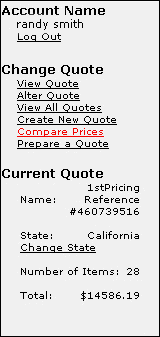 Account Name: Displayed just below Account Name and above Log Out . If you are not logged in or do not have an account New User? and register will be displayed at the top of this box.
Change Quote: This is where you can access saved quotes and create new quotes. The first choice, View Quote will show you what products are in the quote you have open. Alter Quote will allow you to rename window locations, change quantities and delete items you've added. Remember to click the update cart button located at the bottom of the page to save your changes to the quote. View All Quotes shows all the quotes you have saved and allows you to open, view, rename or delete any saved quote. Create New Quote allows a brand new quote to be created. Once created all you need to do is name it and select the state where the windows are to be delivered. Compare Prices will allow you to see what the cost is in different brands. This is a very handy tool for estimating jobs and instantly checking prices. Prepare a Quote allows the ability to add an additional percentage over and above the cost of the order.
Current Quote: Displays the name, state, number of items and total amount of the quote you are working on.
Step 3: Checking Out
 When your ready to purchase your windows click the check out button and follow the easy steps. 1stwindows does not chargeyour credit card when you input your credit card information ordering windows in our shopping cart. The information is sent to us via secure email and is held in strict confidence. We hold the card as a deposit for your window order and after placing your order online one of our customer representatives will phone you and review your order, just like your local dealer.
Shipping varies per manufacturer but typical rate is $75.00 per order, per manufacturer. Shipping charges will be present in your online order and will be verified by a 1stwindows customer service representative when they contact you to review your order. To view shipping prices for various manufacturers, click here.
Step 4: Delivery
Within 36 hours of the order review we will let you know of your delivery date and approximate delivery time. We will also phone you the day before the delivery just to remind you and let you know within a three- hour window what time your windows are to be delivered. All windows are delivered by the factory direct to you or your job site.
If you are still having problems and need help just call our office at
562.494.9069 or contact us here.
If you have a suggestion on how we can make
page better please contact us here.
Let's go shopping!